 Stripio
Does Removing Metadata Stop AI Detection?
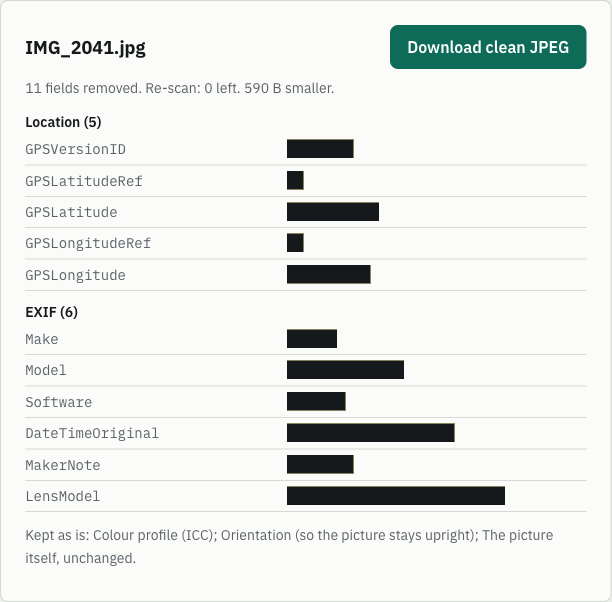
Partly. Removing metadata deletes the notes that platforms read first when they decide whether a picture is AI. It does not change the picture, so anything stored in the pixels is still there. This note goes through what is checked, what a clean file still says, and how to test a file yourself.
How platforms decide a picture is AI
There are four sources, and a platform can use any mix of them.
- Notes in the file. A C2PA content credential, or a
DigitalSourceTypefield set totrainedAlgorithmicMedia. The tool that made the picture wrote them, so they are cheap to read and hard to argue with. Meta, TikTok and LinkedIn have said publicly that they read them. - Watermarks in the pixels. Some generators hide a signal in the picture itself. Google's SynthID is the best-known example.
- The platform's own analysis. A classifier looks at the picture and estimates whether a model produced it.
- What the uploader says. Most platforms ask you to mark AI content when you post.
The first source is the only one a metadata tool can touch.
What is left after the metadata is gone
A clean file has no credential, no AI source tag and no saved prompt. An app that depends on those notes has nothing to read. That is a real change, because notes in the file are the most common reason a label appears.
The file still says a few things:
- The pixels are unchanged. Any watermark in them is intact, and so is everything a classifier looks at.
- The picture has no history. A photo from a phone normally carries a camera model, a lens and a time. A file with none of that is not proof of anything, since many apps strip metadata on export, but it does not look like a camera original either.
- Its size can be a hint. Generators favour a small set of sizes, such as 1024 by 1024. Cameras do not.
None of these is a statement the way a credential is. They are hints, and platforms weigh them differently.
Which signals cannot be removed
Three things are outside what any metadata remover can do.
A watermark in the pixels survives, because taking it out means altering the picture. Resizing, cropping or screenshotting may weaken some watermarks, but there is no dependable way to know whether one is gone.
A label on a post that is already live belongs to the platform. Cleaning the file on your computer does not reach it.
Your duty to disclose stays as well. If a platform, a client or the law asks you to say that a picture is AI-generated, a clean file does not change that.
How to check a file yourself
- Drop the file into the AI metadata detector and read the report. Look for a group named "C2PA content credentials" and for a
DigitalSourceTyperow. - If you want those notes gone, remove AI metadata from a photo with the main tool. It deletes the notes and leaves the picture exactly as it was.
- Drop the clean file in again. The report should say that nothing was found. The tool also runs this re-scan for you and prints the number of fields left.
An empty report tells you one thing: the file no longer carries metadata that says "AI". It cannot tell you whether a watermark is present, or what a platform's own analysis will conclude. For that reason, treat a clean report as the end of the metadata question and not as a guarantee about labels.
To see what a credential contains before you delete it, read what C2PA content credentials store.