 Stripio
 / Video metadata
Remove metadata from video
The video stays on your device and is never uploaded. Drop an MP4 or MOV up to 20 MB to see its hidden data, then remove the metadata from the video without re-encoding a single frame.
iPhone photo saved as HEIC? Share it with Options set to Most Compatible, or open Settings, Camera, Formats and choose Most Compatible, then drop the JPEG copy here.
The free plan holds 3 files at a time. Pro holds 50. See what Pro adds
Files are read and rewritten in this browser tab. They are never uploaded.
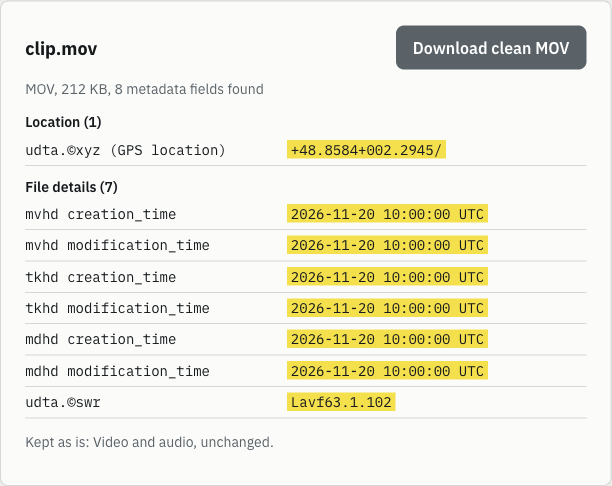
Example report. Yours appears here, listed field by field before anything is removed.
- GPSLatitude48.858400°
- GPSLongitude2.294500°
- MakeExample Phone Co.
- DateTimeOriginal2026:05:14 09:30:00
- MakerNote(1.4 KB)
- digitalSourceTypetrainedAlgorithmicMedia
- c2pa.claim
Where AI metadata sits in a video file
A video file holds the picture and sound, plus a few small blocks of notes around them. Those notes are where metadata lives.
- Content credentials (C2PA). AI video generators that sign their output attach a record naming the tool.
- Location. Phones write where the clip was shot. In the report this shows up as
©xyz,lociorlocation.ISO6709. - Device and software. The make and model of the phone, the app that exported the clip, a title or a comment.
- Dates. When the clip was created and last changed.
How Stripio removes AI metadata from a video
A video file has an index that says where each frame is. If you cut something out of the file, everything after it shifts and the index points to the wrong place. That is how careless tools produce videos that will not play.
Stripio does not cut anything out. It wipes each block of notes blank and leaves it where it is. Players skip the blank blocks. The file keeps its exact length, so the index stays right and every frame is untouched. The report lists each item that was erased. To check the result again later, drop the clean clip into the AI metadata detector.
When to use ffmpeg instead
If a file is over 20 MB, has a layout the tool cannot read, or carries a separate data track (some action cameras record GPS this way), the page says so and leaves the file alone. This command does the job on your own computer without re-encoding:
ffmpeg -i input.mp4 -map 0:v -map 0:a? -map_metadata -1 -c copy output.mp4
For still photos, use the photo metadata remover. To strip only content credentials, see remove C2PA metadata.
Related tools
- Remove AI metadata from a photoThe main tool. Location, camera and AI fields in JPEG, PNG and WebP photos and images.
- AI image metadata removerSaved prompts, seeds and workflows, AI tags and content credentials in generated images.
- Remove AI labelThe hidden notes that make apps show "Made with AI", and what deleting them changes.
- Remove C2PA metadataWhat a content credential declares, and how to delete it.
- AI metadata detectorList every field in a file without changing anything.
Questions about video metadata
- Why is there a 20 MB limit?
- The whole file has to fit in the memory of this browser tab, together with the clean copy, and 20 MB keeps that reliable on phones. The paid Pro plan raises the limit to 200 MB. For a clip larger than your limit, the page shows an ffmpeg command that does the same job on your own computer.
- Does removing metadata re-encode the video?
- No. The picture and sound are not touched. Only the hidden notes are erased, so quality, length and file size stay the same.
- Why is the clean video the same size as the original?
- The hidden notes are wiped blank instead of being cut out. Nothing in the file moves, which is what keeps the video playable.
- Does it work when the moov box is at the start of the file?
- Yes. Because nothing in the file moves, it does not matter where the index (the moov box) sits. Web-optimised "fast start" files work the same way as files straight from a camera.
- Does it remove a visible watermark from an AI video?
- No. A watermark drawn on the frames is part of the picture. This tool only removes data stored around the streams.
- Which metadata can it not remove?
- Timed data tracks, such as a GPS track recorded by an action camera. The report warns you when one is present and gives the ffmpeg command that drops it.