 Stripio
 / AI metadata detector
AI metadata detector
The file is read in this browser tab and never uploaded. Drop a photo or video to list every metadata field inside it. Nothing is changed unless you choose to remove them.
iPhone photo saved as HEIC? Share it with Options set to Most Compatible, or open Settings, Camera, Formats and choose Most Compatible, then drop the JPEG copy here.
The free plan holds 3 files at a time. Pro holds 50. See what Pro adds
Files are read and rewritten in this browser tab. They are never uploaded.
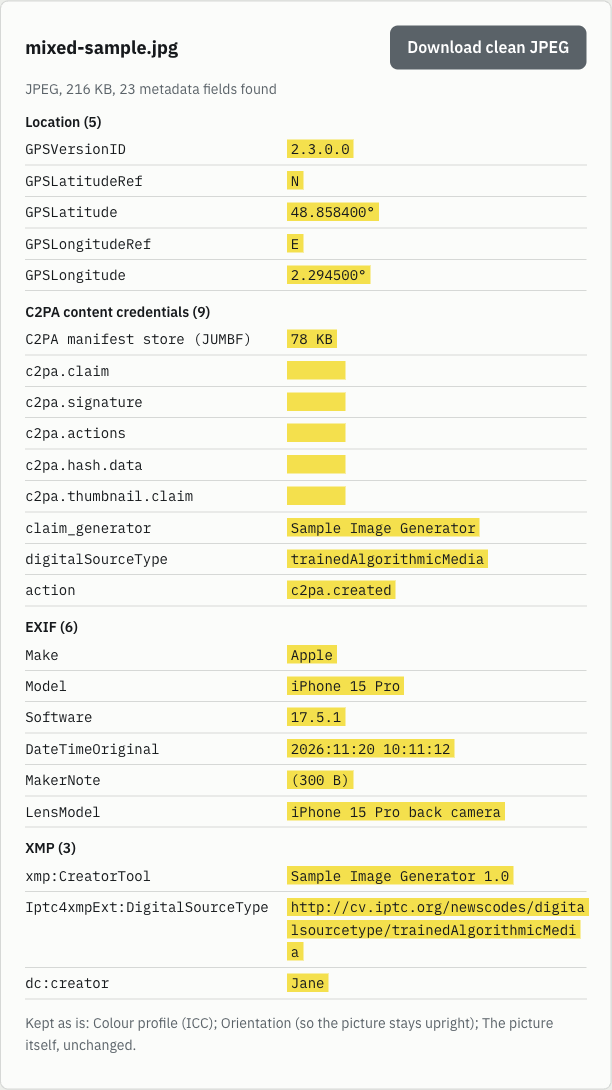
Example report. Yours appears here, listed field by field before anything is removed.
- GPSLatitude48.858400°
- GPSLongitude2.294500°
- MakeExample Phone Co.
- DateTimeOriginal2026:05:14 09:30:00
- MakerNote(1.4 KB)
- digitalSourceTypetrainedAlgorithmicMedia
- c2pa.claim
What the AI metadata detector looks for
The detector opens the file on your device and lists every hidden field it can read. These are the ones that point to AI.
| Signal | Where it is stored | What you see in the report |
|---|---|---|
| Content credential (C2PA) | Its own signed block | c2pa.claim, claim_generator, digitalSourceType |
| "AI-made" tag | Editing tags (XMP) | Iptc4xmpExt:DigitalSourceType |
| Generator name | XMP or EXIF | xmp:CreatorTool, Software |
| Prompt and settings | Text notes in PNG files | tEXt:parameters, tEXt:prompt, tEXt:workflow |
It also lists the ordinary fields that have nothing to do with AI: GPS position, camera model, lens, dates and embedded thumbnails.
How to read the report
Fields are grouped by type, with location first because it is the most sensitive. Each row is a real tag name from your file with its value next to it. A long file is cut to the first rows with a link to show the rest.
Below the fields, a line says what the tool would keep if you removed everything: the colour profile, the orientation and the image data.
What an empty report means
An empty report means the file carries no metadata this tool can read. It does not mean the picture is authentic or camera-made. Metadata is easy to lose, and it is lost every time a file passes through an app that re-saves it.
The reverse also holds. A manifest that says "edited with an AI tool" may describe one small retouch on a real photograph.
Before and after cleaning
The detector is the first step and the last one. Use it first to see what a file carries. If the report shows fields you do not want to share, pick the tool that fits the file:
- For a photo from a phone or camera, remove AI metadata from a photo on the main page.
- For a picture from an AI generator, with a saved prompt, use the AI image metadata remover.
- For a content credential, remove C2PA metadata.
- For an MP4 or MOV clip, remove metadata from a video.
Then drop the clean file back in here. The report should come back empty.
Related tools
- Remove AI metadata from a photoThe main tool. Location, camera and AI fields in JPEG, PNG and WebP photos and images.
- AI image metadata removerSaved prompts, seeds and workflows, AI tags and content credentials in generated images.
- Remove metadata from a videoLocation, device and AI notes in MP4 and MOV clips, erased with no re-encode.
- Remove AI labelThe hidden notes that make apps show "Made with AI", and what deleting them changes.
- Remove C2PA metadataWhat a content credential declares, and how to delete it.
Questions about detecting AI metadata
- Can this tell me whether an image is AI-generated?
- It tells you whether the file says so. If a C2PA manifest, an AI source-type tag or a prompt chunk is present, the report shows it. A file with no metadata proves nothing either way.
- Does the detector change my file?
- No. Listing the fields is read-only. A clean copy is only offered for download after you press the remove button.
- Why does the report show no metadata on a picture I know is AI?
- Screenshots, messaging apps and most social platforms strip metadata when they re-save a picture. The marks were removed before the file reached you.
- What does trainedAlgorithmicMedia mean?
- It is the IPTC digital source type for content created by a generative AI model. It is the most common machine-readable AI label in image metadata.
- Can it detect invisible watermarks?
- No. Watermarks such as SynthID live in the pixels and need the vendor's own detector. This page reads metadata only.
- Which file types can I check?
- JPEG, PNG and WebP images, and MP4 or MOV videos, up to 20 MB each and three at a time.