 Stripio
 / Remove AI label
Remove AI label from photos, videos and AI images
Your file is checked inside this browser tab and never uploaded. Drop a photo, a video or an AI image to see which hidden notes make apps show an AI label, then remove them without changing the picture.
iPhone photo saved as HEIC? Share it with Options set to Most Compatible, or open Settings, Camera, Formats and choose Most Compatible, then drop the JPEG copy here.
The free plan holds 3 files at a time. Pro holds 50. See what Pro adds
Files are read and rewritten in this browser tab. They are never uploaded.
Example report. Yours appears here, listed field by field before anything is removed.
- GPSLatitude48.858400°
- GPSLongitude2.294500°
- MakeExample Phone Co.
- DateTimeOriginal2026:05:14 09:30:00
- MakerNote(1.4 KB)
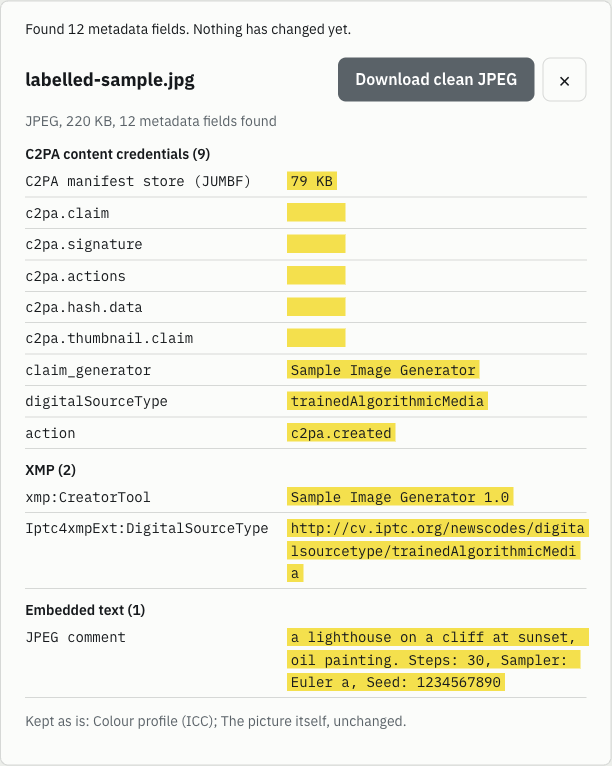
- digitalSourceTypetrainedAlgorithmicMedia
- c2pa.claim
Which apps add an AI label, and why
Instagram, Facebook and Threads show "AI info". TikTok shows "AI-generated". LinkedIn shows a small content credentials mark. In most cases the app did not judge the picture. It read a note that was already inside the file, written by the tool that made or edited it.
Three kinds of note can be there, and the report at the top of this page names each one it finds.
- A content credential. A signed record from the generator or editing app. It is the most common cause of an AI label.
- An AI source tag. One metadata field,
DigitalSourceType, set totrainedAlgorithmicMedia. It means "a generative AI model made this". - A saved prompt. Text written by Stable Diffusion or ComfyUI. Platforms rarely use it for labelling, but anyone who opens the file can read it.
A label does not always mean the whole picture is AI. Photo apps write the same notes after one AI-assisted edit, such as erasing an object.
What removing the metadata changes
A clean file no longer states that it was made with AI. An app that relies on the file's own notes has nothing to read, so the file gives it no reason to add the label. The picture is not touched, and the page checks the clean file again afterwards.
What it cannot remove
- Invisible watermarks. Some generators, including Google's with SynthID, hide a signal in the pixel values. It is not metadata, and it survives cleaning.
- A platform's own detection. A platform can analyse the picture and label it without any notes in the file.
So removing the metadata takes away the most common signal. It is not a promise that no platform will ever label the picture.
AI label on Instagram and Facebook
Instagram, Facebook and Threads show the same "AI info" label. On a published post, that label is not in your file. The platform attached it to the post when you uploaded. Cleaning the file on your device afterwards changes nothing on the post.
There are two cases.
- You added the label yourself. Platforms that let you mark a post as AI usually let you unmark it. Edit the post and switch the AI label off.
- The platform added it. There is no switch. The way forward is to delete the post, clean the original file with the tool on this page, and upload the clean file as a new post. Likes and comments on the old post are lost.
A story works the same way. It cannot be re-labelled once it is live. It leaves view after 24 hours, but the copy in your archive or highlights keeps its label, and so does any copy that was shared on. Clean the file before you post it again.
Posting a clean file does not guarantee a post without a label, for the reasons in the section above. Most of these labels start from a content credential in the file. To read what one declares before you delete it, see remove C2PA metadata.
AI label on a video
A video gets labelled for the same reason as a photo: a content credential or an AI source tag stored in the MP4 or MOV file. The tool on this page accepts clips up to 20 MB. It wipes those notes without re-encoding, so the picture and the sound are not touched.
The rule about published posts is the same too. A label on a video that is already online belongs to the post, so clean the file first and upload it again. The page on how to remove metadata from video explains how the notes are wiped, and what to do with a larger file.
AI labels in ChatGPT and other generated images
A generator writes its notes at the moment it saves the image, so the label can appear the first time you post the file. Which note it is depends on the tool.
- ChatGPT. OpenAI states that images made with ChatGPT carry C2PA content credentials naming its tool.
- Stable Diffusion and ComfyUI. They save the prompt, the seed and the settings as text inside the file.
- Photo apps with AI features. One generative edit can add a credential or an AI source tag to a real photo.
Drop the image on the tool at the top of this page and the report shows which of these your file carries. For saved prompts and workflows, use the AI image metadata remover.
How to remove an AI label from a photo
- Drop the photo on the tool at the top of this page. It stays on your device.
- Read the report. Look for the group named "C2PA content credentials" and for a
DigitalSourceTyperow. - Press the remove button. Each value is blacked out as its field is deleted.
- Download the clean file and post that one in place of the original.
Checking a file first
To look without changing anything, use the AI metadata detector. For everyday phone photos, where location and camera details matter more than AI notes, the main photo metadata remover covers the full list.
Related tools
- Remove AI metadata from a photoThe main tool. Location, camera and AI fields in JPEG, PNG and WebP photos and images.
- AI image metadata removerSaved prompts, seeds and workflows, AI tags and content credentials in generated images.
- Remove metadata from a videoLocation, device and AI notes in MP4 and MOV clips, erased with no re-encode.
- Remove C2PA metadataWhat a content credential declares, and how to delete it.
- AI metadata detectorList every field in a file without changing anything.
Questions about removing an AI label
- Does removing metadata also remove the AI label?
- It removes the usual cause. Most labels are triggered by hidden notes in the file, and a clean file no longer carries them. A platform can still add a label from a watermark in the pixels or from its own detection.
- How do I remove the AI label from my Instagram post?
- If you added the label yourself, edit the post and switch it off. If Instagram added it, there is no switch. Delete the post, clean the original file here, and upload the clean file as a new post. Instagram can still label it from a watermark or its own detection.
- How do I remove the AI label from an Instagram story?
- A story cannot be re-labelled once it is live. Delete it, clean the file here, and post the clean file again. A story leaves view after 24 hours, but the copy in your archive or highlights keeps its label.
- Why did my real photo get an AI label?
- Usually because an editing app used a generative feature, such as removing an object, and wrote a note saying so. The note does not say how much of the picture was changed, so one small edit can label the whole photo.
- Does this remove SynthID or other invisible watermarks?
- No. An invisible watermark is stored in the pixels themselves. Removing it would mean changing the picture, and this tool never changes the picture.
- Will the photo lose quality?
- No. The picture is not opened or saved again. Only the hidden notes are left out of the new file, and the colour profile is kept.
- Does it work for videos?
- Yes, for MP4 and MOV files up to 20 MB. The same notes are wiped from the video file without re-encoding it.
- Do I still have to say that a picture is AI-generated?
- Removing a label does not change the rules. Where a platform, a client or the law asks you to disclose AI-generated content, that duty stays with you.