 Stripio
 / C2PA metadata
Remove C2PA metadata
Files are handled in this browser tab and never uploaded. Drop a photo or video to see whether it carries a C2PA manifest, read what the manifest declares, and remove it.
iPhone photo saved as HEIC? Share it with Options set to Most Compatible, or open Settings, Camera, Formats and choose Most Compatible, then drop the JPEG copy here.
The free plan holds 3 files at a time. Pro holds 50. See what Pro adds
Files are read and rewritten in this browser tab. They are never uploaded.
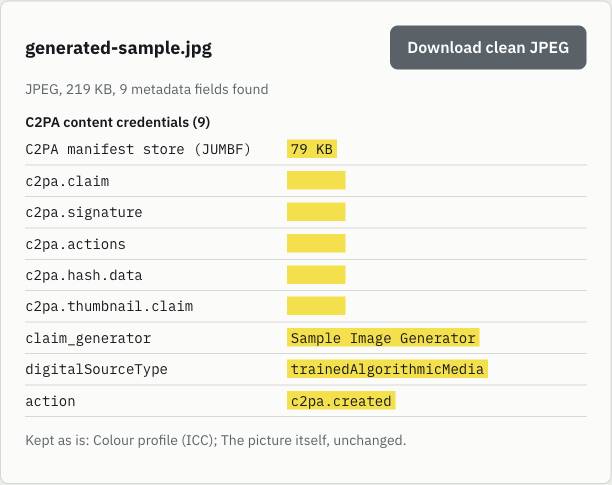
Example report. Yours appears here, listed field by field before anything is removed.
- GPSLatitude48.858400°
- GPSLongitude2.294500°
- MakeExample Phone Co.
- DateTimeOriginal2026:05:14 09:30:00
- MakerNote(1.4 KB)
- digitalSourceTypetrainedAlgorithmicMedia
- c2pa.claim
What C2PA metadata records
C2PA metadata is a signed note inside a file that says which app made or edited it. Apps and platforms that support it read the note and show a label such as "made with AI". The note is called a manifest, and it has a few parts. The report above names the ones it finds.
- Who wrote it.
c2pa.claimholds the name of the software, shown asclaim_generator. - What was done.
c2pa.actionslists steps such as created or edited. AdigitalSourceTypeoftrainedAlgorithmicMediais the part that means generative AI. - Proof it is genuine.
c2pa.signatureis the maker's digital signature, andc2pa.hash.dataties the note to this exact file. - Extras. A small preview (
c2pa.thumbnail.claim) and the source files (c2pa.ingredient), when present.
How to remove C2PA metadata
- Drop the file on the tool at the top of the page.
- Look for the group named "C2PA content credentials" in the report.
- Press the remove button, then download the clean file.
The credential sits beside the picture, not inside it, so it can be taken out without changing a pixel. In a video it is wiped blank in place so the clip still plays. Other hidden data in the file, such as location and camera details, is removed in the same pass.
What removal does not do
It does not edit a credential or forge a new one. The credential is deleted whole. It also cannot remove a watermark in the pixels, or a label a platform has already attached to a post.
To inspect a file without changing it, use the AI metadata detector. For clips, see how to remove metadata from video, which explains the in-place method.
Related tools
- Remove AI metadata from a photoThe main tool. Location, camera and AI fields in JPEG, PNG and WebP photos and images.
- AI image metadata removerSaved prompts, seeds and workflows, AI tags and content credentials in generated images.
- Remove metadata from a videoLocation, device and AI notes in MP4 and MOV clips, erased with no re-encode.
- Remove AI labelThe hidden notes that make apps show "Made with AI", and what deleting them changes.
- AI metadata detectorList every field in a file without changing anything.
Questions about C2PA metadata
- What is C2PA metadata?
- A signed record attached to a media file that states which tool created or edited it. It is also called a content credential, and it is defined by the Coalition for Content Provenance and Authenticity.
- Where is C2PA metadata stored in a file?
- In its own block inside the file, separate from the picture. Technically it is a JUMBF container, held in APP11 segments in JPEG, a caBX chunk in PNG, a C2PA chunk in WebP and a uuid box in MP4 or MOV.
- Does removing the manifest damage the file?
- No. The manifest sits beside the image or video data, not inside it. The picture and the colour profile are left exactly as they were.
- Can a removed content credential be recovered?
- Not from the clean file. Some tools also store credentials in a cloud service and match them to the picture later, and a metadata tool cannot affect that.
- Does this remove SynthID or other invisible watermarks?
- No. Those are embedded in the pixels. C2PA metadata and watermarks are two separate systems, and this page only removes the first.
- Should I remove C2PA metadata?
- That is your call. Credentials help viewers trust where a file came from. People remove them for privacy, or because a credential from one editing step mislabels the whole picture.